 Copy for AI
Stuck on a question?
Click once, get the answer.
Copy for AI reads the page you're on – a quiz, a worksheet, a PDF, even a photo of a problem – and gives you the answer. Turn on Answer only for just the result, or ask for a step-by-step explanation when you want to actually learn it.
Add to Chrome – 5 free answers a day See Pro Math, physics, chemistry, programming, languages, multiple choice – answers in the language of the question.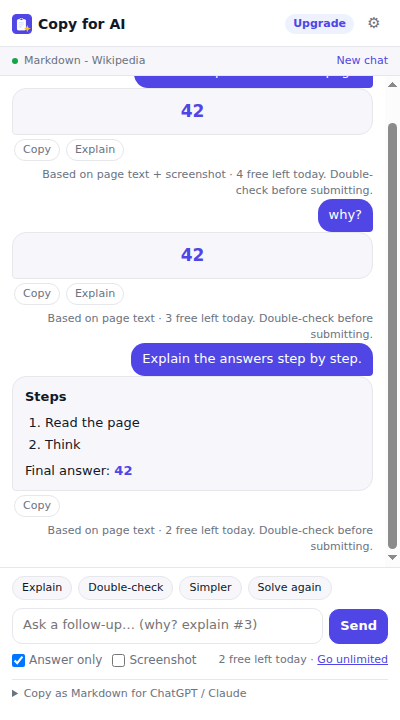
Understands the whole page
Reads the text of the page you have open and solves every question it finds – numbered, so you can match answers to questions.
Agent: fills in the whole lesson
Solve whole lesson answers every question right on the page – picks the correct choice, types into the answer fields, drags matching items into place – then clicks Next / Check / Submit for you and keeps going until the last question, even with the panel closed. Prefer to review first? Turn off “Auto-submit & next”.
Can't read it? It looks at it
Scanned PDFs, images, diagrams, math rendered as pictures, locked quiz platforms: when the text isn't readable, a screenshot of the page is analysed instead.
Answer only – or explain
Flip Answer only for the bare result (A / 42 / true). Click Explain to get the steps when you need to understand the method.
Stays open, keeps the thread
Lives in Chrome's side panel next to the page. Reload, scroll, switch tabs – your answers stay put. Ask follow-ups like “why?” or “explain #3” and it remembers the page and what it already said.
Answers as they're written
Answers stream in word by word instead of making you wait. Select a question on the page, or type “only question 3”, to focus on exactly that. Alt+Shift+S solves from anywhere.
Professional-grade model
Powered by Google Gemini with vision. Fast, accurate on STEM, and it answers in the same language as your question.
Still copies pages as Markdown
Copy a page, a selection or all your tabs as clean Markdown for ChatGPT or Claude – with token counts and prompt templates.
Simple pricing
- 5 answers per day (text + screenshot)
- Answer-only and Explain modes
- Copy page or selection as Markdown
- Keyboard shortcut & right-click menu
- Unlimited answers, every day
- Everything in Free
- Bundle all open tabs into one document
- Unlimited custom prompt templates
- Copy history (last 30 items)
Secure checkout by Stripe. Your license key appears right after payment. Lost your key?
FAQ
What kind of questions can it solve?
Anything written on a web page: multiple choice, short answer, math and physics problems, chemistry, code, grammar, reading comprehension. If the page is a PDF or an image, the screenshot is analysed instead.
Does the extension send my pages anywhere?
Only when you click Solve. The page text and, if enabled, a screenshot of the visible area are sent to our server and processed by Google Gemini to produce the answer. They are not stored. Copying as Markdown stays entirely in your browser. See the privacy policy.
Do I need my own API key or account?
No. Install and click – no sign-up. Pro is unlocked with a license key you receive right after checkout.
Can I use Pro on multiple computers?
Yes. Activate your key in every browser you use; it syncs with your Chrome profile.
How do I cancel?
Any time from the Stripe receipt email (“Manage subscription”) or by emailing us. You keep Pro until the end of the paid month.